Why is my check blocked by Vercel Firewall?
When Urlcheckr checks a URL hosted on Vercel, the Vercel Firewall may identify the request as automated traffic and return a 429 Too Many Requests response instead of following the redirect chain.
What you'll see
In the result detail for the affected check you'll see:
- A final status code of 429
- The response header
x-vercel-mitigated: challengein the response headers section
This means the Vercel Firewall has actively intervened and did not pass the request through to the origin.
Why this happens
Vercel's built-in firewall inspects incoming requests and may block traffic that resembles automated bots. Urlcheckr sends requests with the User-Agent string Urlcheckr/3.0, which is not on Vercel's allowlist by default.
When the firewall sees this User-Agent it returns a challenge response (x-vercel-mitigated: challenge) rather than forwarding the request. The result is that Urlcheckr cannot complete the check.
How to fix it
If you own or manage the Vercel project being checked, add a custom firewall rule to bypass requests from Urlcheckr:
- Go to your project in the Vercel dashboard.
- Open Firewall → Custom Rules.
- Click Create Rule.
- Configure the rule:
- Condition: User Agent → equals →
Urlcheckr/3.0 - Action: Bypass
- Condition: User Agent → equals →
- Save and deploy the rule.
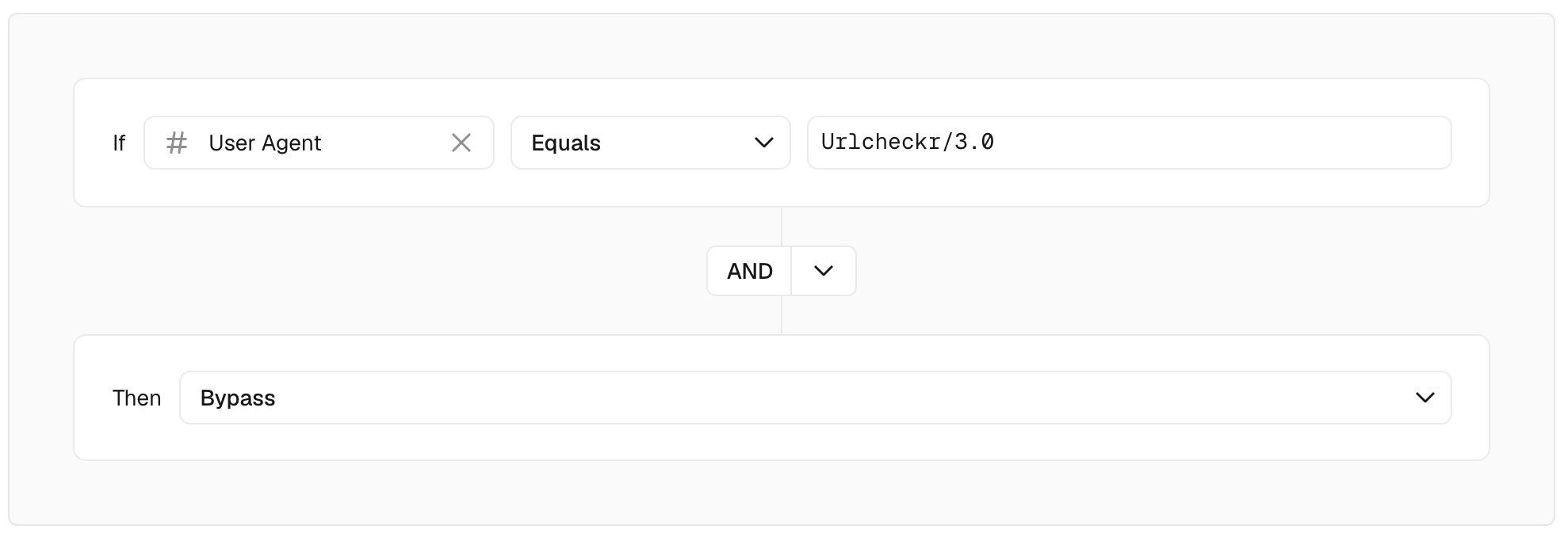
Urlcheckr checks will now pass through the firewall without interruption.
What about IP whitelisting?
Vercel Custom Rules do support IP Address as a condition with a Bypass action, which would technically allow you to whitelist specific IP addresses. However, this is not a practical solution for Urlcheckr.
Currently we use Trigger.dev to run checks in the background. Our Trigger.dev jobs run on infrastructure with a dynamic IP address, meaning the IP address is not guaranteed to stay the same between runs. Maintaining an IP allowlist would therefore require constant updates and would frequently break.
Still seeing the error?
If you've applied the firewall rule and the error persists, the rule may not have propagated yet (allow a few minutes) or the rule condition may not match exactly. Check that the User-Agent string in the rule is identical to what Urlcheckr sends — you can confirm the exact value in the Request headers section of the result detail.
For further help, reach out at support@urlcheckr.app.